What is a Keyboard PCB?
Ever wondered what makes a keyboard tick? It's not magic, but it's close. The hero of our story is the Printed Circuit Board (PCB)—a slim, elegant board that acts as the central nervous system for your entire keyboard. Think of it as the foundation upon which your dream keyboard is built. It's the component that transforms a collection of plastic and metal parts into a precision instrument. Without it, your fancy switches and artisan keycaps would be nothing more than an expensive paperweight.
In this guide, we'll demystify the PCB, breaking down what it is, how it works, and why it's arguably the single most critical decision you'll make in your custom keyboard journey. We'll explore its materials, the intricate layers that form it, and the clever electronics that allow it to read your every keystroke with microsecond precision. By the end, you'll understand not just what a PCB does, but how to choose one that's perfect for your needs.
What Exactly Is a PCB?
At its core, a PCB is a board made from layers of non-conductive material with copper pathways—called "traces"—precisely etched onto it. The most common base material is FR-4, a flame-retardant fiberglass-reinforced epoxy laminate that sounds complicated but is essentially very strong, electrically insulating fiberglass. It's rigid, durable, and has excellent electrical insulating properties, making it the perfect skeleton for our keyboard's nervous system.
These copper traces are like a complex network of microscopic roads that carry electrical signals from your key switches to the keyboard's "brain"—the microcontroller. When you press a key, you're completing a circuit, and the PCB is what makes that connection possible in a reliable, consistent manner thousands of times per day.
The Layers of a PCB: A Beautiful Sandwich
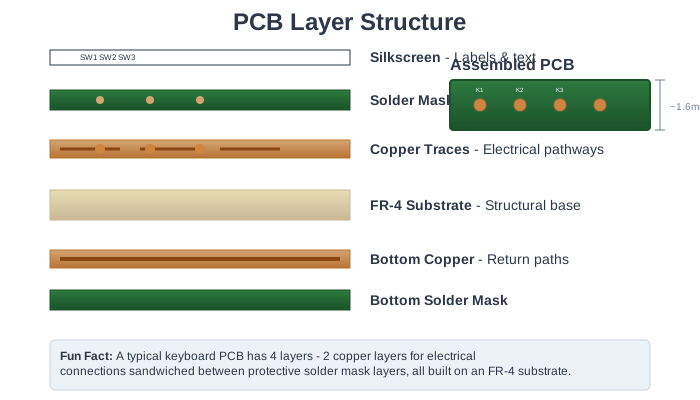
A typical keyboard PCB is an elegant sandwich of multiple distinct layers, each serving a specific purpose. Let's peel back the layers:
-
Substrate (FR-4): This is the base material—the structural foundation that gives the PCB its rigidity and provides electrical insulation between copper layers. It's typically about 1.6mm thick, though some premium boards use thicker substrates for added stiffness.
-
Copper Traces: Thin layers of copper foil (typically 1-2 ounces per square foot) are laminated to both sides of the substrate. Through a photographic etching process, unwanted copper is removed, leaving behind the precise pathways that form your keyboard's circuitry. These traces connect switches to the controller, power LEDs, and link all components together.
-
Solder Mask: This is the colorful layer you actually see—typically green, but can be black, white, purple, red, or even custom colors. It's a protective polymer coating applied over the copper traces that serves two critical functions: it prevents accidental short circuits between traces, and it stops solder from bridging between pins during assembly. The mask has precise openings where components need to be soldered.
-
Silkscreen: The final cosmetic layer adds white (or sometimes other colored) text, symbols, and logos to the board. This layer labels switch positions (like "ESC" or "SPACE"), marks component locations, and displays the PCB designer's branding. It's purely informational but incredibly helpful during assembly and troubleshooting.
The Magic of the Matrix: Engineering Elegance
Here's where keyboard design gets truly clever. Imagine trying to wire a 104-key keyboard with a dedicated wire for every single key—you'd need 104 wires running to your microcontroller! It would be a tangled, expensive, impractical nightmare.
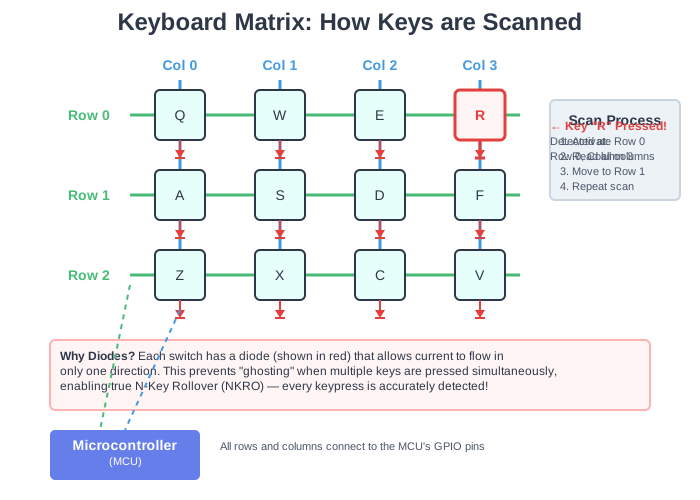
Instead, keyboards use an brilliant solution called a key matrix. The switches are arranged in a logical grid of rows and columns, like cells in a spreadsheet. A typical 60% keyboard might use 5 rows and 14 columns, requiring only 19 connections instead of 60+. The microcontroller constantly "scans" this grid by sending a signal down each row one at a time while monitoring all columns. When you press a key, it connects its specific row to its column, and the controller instantly knows "Aha! The key at Row 2, Column 5 is pressed!" This scanning happens so fast (usually hundreds to thousands of times per second) that there's zero perceptible delay.
The Diode: A Tiny Component with a Critical Job
But there's a potential problem with this elegant matrix design called "ghosting." Without protection, when you press certain combinations of keys, the electrical signals can take unexpected paths through the matrix, causing the controller to detect phantom key presses that never happened. This is where the humble diode becomes a hero.
Each switch has a tiny diode soldered in series with it. A diode is a one-way valve for electricity—it allows current to flow in only one direction. This prevents signals from bleeding backwards through the matrix and creating false keypresses. With diodes in place, your keyboard gains N-Key Rollover (NKRO), meaning it can accurately detect every single key press, even if you somehow manage to press every key simultaneously. For fast typists and gamers who routinely hit multiple keys at once, this is absolutely essential.
Why Your PCB Choice Defines Your Build
Choosing a PCB isn't just about finding something that fits your case—it's about understanding that the PCB dictates almost everything about your keyboard's capabilities, compatibility, and future potential:
-
Physical Layout: Want a compact 60% board? A tenkeyless (TKL)? A full-size with dedicated numpad and function keys? Your PCB defines the physical arrangement, size, and positioning of every key.
-
Feature Set: Dreaming of adding a rotary encoder (volume knob)? Want a tiny OLED screen showing fun animations or system stats? Need per-key RGB lighting that dances to your music? All these features require PCB support—you can't add them later if the hardware isn't there.
-
Switch Compatibility: Your PCB determines whether you need 3-pin (plate-mount) or can use 5-pin (PCB-mount) switches, and critically, whether you can hot-swap switches or need to commit to soldering them permanently.
-
Mounting Style: The PCB must have the correct mounting holes, standoff positions, and structural design to work with your chosen mounting style—whether that's traditional tray mount, premium gasket mount, or innovative top mount.
-
Firmware Capability: The microcontroller integrated into (or connected to) your PCB determines what firmware it can run. QMK? VIA? ZMK for wireless? This affects how programmable your keyboard can be, what features you can enable, and how easy it is to customize your layout.
Think of the PCB as the blueprint and foundation for your entire build. It sets both the boundaries and the possibilities for what you can create. Every other component choice—case, switches, keycaps—must work within the framework your PCB defines.
The PCB: Where Form Meets Function
The beauty of a well-designed keyboard PCB isn't just technical—it's also aesthetic. A quality PCB with clean solder mask application, precise silkscreen legends, and thoughtful component placement is genuinely beautiful to behold. Many modern builds feature translucent or acrylic cases specifically to showcase the PCB's design. Some builders even select PCBs based on solder mask color to complement their overall aesthetic vision.
But beyond looks, a quality PCB means reliability. Well-designed traces minimize electrical noise. Proper component selection ensures longevity. Good engineering means your keyboard will work flawlessly for years, potentially decades.
Ready to Design Your Perfect Board?
Now that you understand what a PCB is and why it matters, you're ready to make informed decisions about your build. In our next guide, we'll explore How Your Choices Shape Your PCB Design and help you navigate the dizzying array of options to find your perfect match.
Curious about those switches that mount to the PCB? Dive into The World of Keyboard Switches to understand what makes them so special.
Want to Learn More?
- How a Keyboard Matrix Works (YouTube Video) - Visual explanation of matrix scanning
- PCB Manufacturing Process Explained - Deep dive into how PCBs are made
- Understanding Diodes in Keyboard Matrices - Technical discussion of why diodes matter