Understanding Keycap Profiles and Shapes
Switches might be the soul of a mechanical keyboard, but keycaps are its face—the part you see, touch, and interact with thousands of times daily. Beyond material and color, the profile—the physical shape, height, and sculpting of your keycaps—profoundly influences how your keyboard feels, sounds, and performs.
The right profile can make typing feel like gliding across silk. The wrong one can turn every session into a finger-stretching marathon. Understanding keycap profiles isn't just about aesthetics (though they're gorgeous)—it's about matching the physical interface to your typing style, keyboard layout, and ergonomic needs.
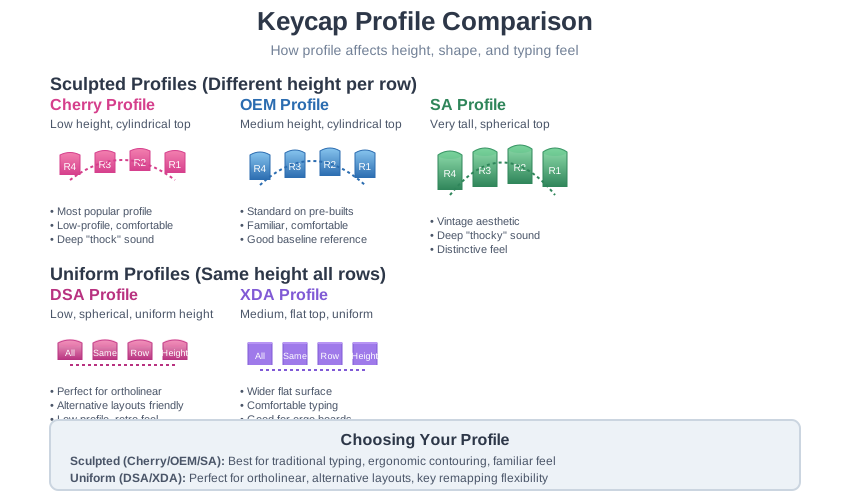
The Two Philosophies: Sculpted vs. Uniform
Keycap profiles fall into two fundamental design philosophies, each with passionate advocates and distinct advantages.
Sculpted Profiles: Contouring to Your Fingers
Sculpted profiles feature different heights and angles for each row, creating a natural curve that mirrors the arc your fingers make when typing. Your hands rest in a slight dome over the keyboard, and sculpted keycaps follow that dome.
Think of it like a custom-fitted glove for your fingertips. The top row (numbers) is higher and angled away. The bottom row is lower and angled toward you. The home row sits at a neutral height and angle. This contouring can dramatically reduce finger stretching and the awkward angles required to reach keys across different rows.
The main sculpted profiles:
Cherry Profile — The enthusiast's darling, Cherry is a medium-height sculpted profile that strikes a legendary balance. It's low enough to feel sleek and fast, sculpted enough to feel comfortable, and its cylindrical top surface provides pleasant tactile reference. The shorter overall height often produces a deeper, more satisfying sound signature—that coveted "thock." When people talk about premium custom keycaps, they're usually talking about Cherry profile. GMK, the goldstandard manufacturer, produces almost exclusively in Cherry profile.
Best for: Serious typists and enthusiasts who want premium ergonomics without extreme heights
OEM Profile — This is the baseline—the profile on virtually every prebuilt mechanical keyboard from Filco to Ducky to Leopold. It's slightly taller than Cherry and a bit less aggressively sculpted. OEM is comfortable, familiar, and safe. If you've typed on a "nice" mechanical keyboard from a major manufacturer, you've probably used OEM. It's an excellent reference point for understanding how other profiles compare.
Best for: Beginners wanting familiar territory, or anyone seeking a proven, comfortable middle ground
SA Profile — Bold, dramatic, and impossible to ignore. SA is very tall with deeply sculpted spherical tops that evoke vintage computer terminals and IBM typewriters from the 1970s and 80s. The substantial height creates unique ergonomics—your fingers rest in deep, scooped key surfaces that guide them to center. The large internal volume produces incredibly deep, resonant "thocks" that sound simply magnificent. SA isn't subtle; it's a statement. Typing on SA feels like operating a vintage computer terminal—deliberate, weighty, substantial.
Best for: Enthusiasts who love retro aesthetics, want maximum sound depth, and don't mind a learning curve
MT3 Profile — A modern take on tall sculpted profiles, designed by keyboard enthusiast Matt3o. MT3's defining feature is its exaggerated concave scoop—each keytop is deeply dished to cradle your fingertip perfectly. This intense contouring creates a unique "hugging" feel that many find increases typing accuracy. Like SA, it's tall, but the sculpting feels more aggressive and purposeful rather than simply vintage.
Best for: Typists seeking maximum tactile guidance and don't mind a bold profile
KAT Profile — "Keyreative All Touch" is a medium-height profile with smooth, spherical tops. It's like SA's more approachable cousin—you get the satisfying spherical top surface without the extreme height. KAT offers a comfortable middle ground between low Cherry-style profiles and towering SA, making it excellent for those who like spherical tops but find SA too tall for extended typing.
Best for: Users wanting spherical tactility without extreme height
Uniform Profiles: The Flat Plane
Uniform profiles use the same height and shape for every single keycap, creating a completely flat, consistent plane across your keyboard. This might initially seem limiting, but uniform profiles unlock unique advantages.
The genius of uniform profiles emerges when you want flexibility. Remapping keys? Using alternative layouts like Dvorak or Colemak? Building an ortholinear keyboard? With uniform profiles, every key can go anywhere without breaking the sculpting. This is liberation from traditional layout constraints.
The main uniform profiles:
DSA Profile — The classic uniform profile, DSA features medium-low height with spherical, concave tops. Each key has a gentle dish that centers your fingertips. The "A" in DSA comes from its spherical shape (originally "DCS Spherical A"). DSA has a distinctly retro aesthetic reminiscent of old terminals, and its flexibility makes it immensely popular for alternative layouts, ortholinear boards, and experimenting with key positions. The spherical tops provide just enough tactile feedback without being aggressive.
Best for: Alternative layouts, ortholinear keyboards, 40% boards, layout experimenters
XDA Profile — Similar concept to DSA but with important differences: XDA is slightly taller with wider, flatter top surfaces. The dish is much more subtle—almost imperceptible—giving your fingers more surface area to land on. This makes XDA feel spacious and comfortable, especially during long typing sessions. The extra height compared to DSA can also produce slightly deeper acoustics.
Best for: Ortholinear and ergo-split keyboards, users who prefer more finger surface area
KAM Profile — The newest entry to uniform profiles, KAM is essentially a uniform version of Keyreative's sculpted KAT profile. It features smooth, matte texturing and a consistent height with subtle spherical tops. KAM offers a modern, minimalist aesthetic that appeals to users seeking contemporary design language in their keycaps.
Best for: Modern aesthetic lovers, alternative layouts, users wanting KAT feel without sculpting
Choosing Your Perfect Profile: A Decision Framework
With all these options, how do you choose? Consider these factors:
Your Keyboard Layout
Traditional layouts (QWERTY, ANSI, ISO): Sculpted profiles like Cherry or OEM will feel immediately natural. They're designed for standard row structures and will provide ergonomic contouring right out of the box.
Ortholinear or alternative layouts: Uniform profiles like DSA or XDA are practically mandatory unless you want sculpting chaos. Their flexibility lets you remap to your heart's content.
Ergonomic splits and extreme layouts: Both can work, but uniform profiles provide maximum flexibility if your layout is unconventional.
Your Typing Style
Speed-focused touch typist: Lower profiles (Cherry, DSA) often feel faster and require less finger movement. The reduced height can enable quicker key-to-key transitions.
Accuracy-focused typist: Deeper sculpts (SA, MT3) provide more tactile guidance, helping your fingers find home row and reducing misstrokes.
Casual hybrid typist: Medium profiles (OEM, KAT) offer balanced characteristics that work well for both typing and other tasks.
Acoustic Preferences
Deep "thocky" sounds: Taller profiles with larger internal volumes (SA, MT3) produce the deepest, most resonant sounds.
Crisp "clacky" sounds: Lower profiles (Cherry, DSA) tend toward higher-pitched, sharper acoustics.
Remember: Sound is also heavily influenced by switch choice, case material, and internal dampening, but profile plays a significant role.
Ergonomics and Comfort
Long typing sessions (6+ hours daily): Sculpted profiles generally provide better ergonomic support by contouring to natural finger arcs. However, some find uniform profiles equally comfortable once adjusted.
Wrist issues or RSI concerns: Lower profiles (Cherry, DSA) reduce the distance your fingers must travel vertically, potentially reducing strain. Combine with proper desk ergonomics and wrist support.
Finger strength: Taller profiles require slightly more finger extension. If you have arthritis or finger mobility issues, lower profiles may be more comfortable.
Aesthetics Matter Too
Don't underestimate visual appeal. If you love how SA keycaps look with their towering, vintage profile, that emotional connection matters. If you adore the clean, minimalist geometry of DSA on an ortho board, embrace it. You'll type on this keyboard for thousands of hours—it should bring you joy.
The Experimentation Mindset
Here's the secret most experienced builders know: there's no perfect profile, only the perfect profile for you, on this keyboard, for this use case. Many enthusiasts own multiple keycap sets in different profiles because each brings something unique to different boards and moods.
Your first custom keyboard doesn't have to be your last. Start with something familiar (OEM or Cherry), then explore. Borrow sets from local meetups. Buy switch and keycap testers. Read community reviews. The journey of discovering your ideal profile is part of the joy.
What About Mixing Profiles?
Generally, don't. Most sculpted profiles have carefully calculated angle progressions across rows. Mixing profiles breaks this intentional design and creates awkward transitions.
Exception: Artisan keycaps (decorative, custom keys) often use their own profiles and are placed intentionally on specific keys (usually Escape or Enter) as accent pieces.
Next Steps in Your Keycap Journey
Now that you understand how shape and profile affect your typing experience, it's time to explore how those beautiful legends (letters and symbols) get onto your keycaps. Head to Legends and Printing Methods to discover why some keycaps last decades while others fade in months.
Ready to buy? Check out our Where to Buy Keycaps guide for trusted vendors and shopping tips.
Deepen Your Understanding
- All About Keycaps (YouTube Series) - Visual comparison of major profiles
- Keycap Profile Database - Comprehensive profile measurements and comparisons
- /r/MechanicalKeyboards Wiki - Keycaps - Community wisdom on profiles