What is a Mechanical Switch?
Close your eyes and imagine the perfect keystroke. Not the mushy, uncertain squi sh of a rubber dome. Not the vague, inconsistent feedback of a cheap membrane. Imagine crisp precision—the exact moment a key registers, consistent across every press, hour after hour, year after year. That's the promise of a mechanical switch, and it's the beating heart of every custom keyboard.
A mechanical switch is a small marvel of engineering—a self-contained, precision mechanism beneath each keycap. Unlike the rubber dome sheets hiding under most office keyboards, each mechanical switch is an independent unit with its own housing, stem, spring, and metal contacts. It's a tiny engine with one beautifully focused purpose: transforming your keypress into electrical signal with exact, repeatable feedback.
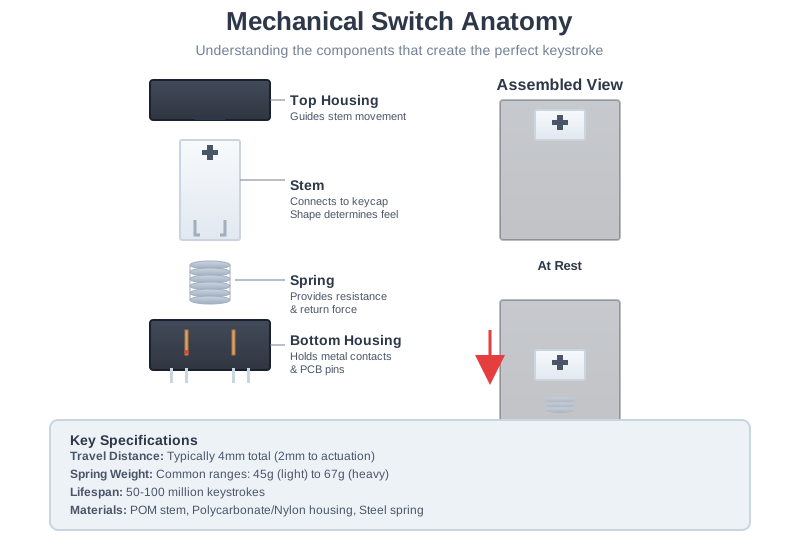
The Magic Happens in Milliseconds
When you press a key, here's what unfolds in a fraction of a second:
-
The Stem Descends: Your finger pushes down the switch stem (the part that connects to your keycap), which travels smoothly through precisely engineered housing guides.
-
The Spring Compresses: Inside the switch, a calibrated steel spring compresses, providing resistance. This spring weight—measured in grams (like 45g, 62g, or 67g)—determines how "heavy" or "light" the switch feels to press.
-
Contact! At a precise point (usually around 2mm down in a 4mm travel), two metal contact leaves inside the switch touch, completing an electrical circuit. This is the "actuation point"—the moment your keypress registers to the computer.
-
The Return: Release your finger, and the spring instantly pushes everything back to the starting position, ready for the next press.
This elegant dance happens consistently across 50 to 100 million keypresses—that's potentially decades of daily typing—without degradation in feel or performance.
Why "Mechanical"? Understanding the Revolution
The term "mechanical" distinguishes these switches from their vastly inferior "membrane" or "rubber dome" predecessors. The difference isn't just technical jargon—it's transformational to anyone who types regularly.
Rubber Dome Keyboards: The Status Quo
In standard office keyboards, a single sheet of rubber domes sits beneath all the keys. Press a key, and you're collapsing a squishy rubber dome that pushes two layers of plastic membrane together. It's cheap to manufacture (which is why it's everywhere), but the experience is compromised:
- Mushy, inconsistent feel: Each dome feels slightly different, and they all feel worse as they age
- No pre-travel feedback: You must "bottom out" (smash the key all the way down) to register, leading to unnecessary force and finger fatigue
- Short lifespan: Most rubber domes degrade after 5-10 million presses—maybe a few years of heavy use
- Unrepairable: When one dome fails, you're often replacing the entire keyboard
Mechanical Keyboards: Precision by Design
Each key on a mechanical board has its own complete switch mechanism. This fundamental difference creates cascading benefits:
- Consistent, tunable feedback: Every switch performs identically, and you can choose the exact feel you want
- Actuation before bottoming out: Most mechanical switches register around 2mm of travel in a 4mm stroke, meaning you don't have to pound keys to type
- Extraordinary lifespan: 50-100 million keystrokes is standard—we're talking decades of intensive use
- Modular and repairable: Single faulty switch? Swap it out. Want different feel? Change individual switches. This isn't just a keyboard; it's an instrument you can maintain and evolve
The Custom Keyboard Revolution
This modularity unlocked the entire custom keyboard hobby. When Cherry's MX switch patents expired in the 2010s, manufacturers worldwide began innovating, creating hundreds of switch variants. Today, you can choose switches with:
- Ultra-smooth linear action or pronounced tactile bumps
- Audible clicks or whisper-quiet operation
- Light 35g actuation or heavy 80g+ resistance
- Specialty materials like POM, Nylon, or Polycarbonate
- Custom springs, pre-lubed internals, or sound-dampening features
The Anatomy of Excellence: Inside a Switch
Understanding what makes switches different requires looking at their components. While hundreds of switches exist today, they all share fundamental anatomy:
1. Top Housing
The upper portion of the switch casing. It guides the stem's movement and protects internal components. Material matters:
- Polycarbonate (PC): Transparent, ideal for RGB lighting to shine through
- Nylon: Slightly softer, produces deeper, more muted sound
- Blends: Some premium switches use mixed materials for specific acoustic properties
Manufacturing tolerances here determine "stem wobble"—how much the stem can wiggle side-to-side. Premium switches minimize this for clean, precise keystrokes.
2. Stem
The star of the show—this is what your keycap mounts to and what you physically push. The stem's shape defines the switch's fundamental character:
- Linear stems: Smooth legs that travel straight down with consistent resistance
- Tactile stems: Legs with engineered bumps that create perceptible feedback at actuation
- Clicky stems: Complex two-part designs that produce audible clicks
Most modern switches use MX-style stems with a + (plus) shaped cross mount, the de facto standard established by Cherry in the 1980s. Made typically from POM (Polyoxymethylene), chosen for its low-friction, self-lubricating properties.
3. Spring
The steel coil that provides resistance and return force. Springs come in various weights and designs:
- Light (45g-55g): Fast, effortless actuation. Popular for gaming
- Medium (60g-65g): Balanced resistance. The comfortable middle ground
- Heavy (67g-80g+): Substantial feedback. Prevents accidental presses
Spring swapping is among the most popular switch modifications—it can completely transform a switch's character.
4. Bottom Housing
Houses the metal contact leaves and spring, with pins that connect to your PCB:
- 3-pin (plate-mount): Two electrical pins and rely on the plate for stability
- 5-pin (PCB-mount): Two electrical pins plus two plastic stabilizer legs for use without a plate
The bottom housing material (often nylon) significantly impacts sound profile—it's what your stem impacts when you "bottom out."
5. Metal Contact Leaves
Hidden inside the bottom housing, these copper alloy leaves are what actually register your keypress. When the stem descends, it pushes one leaf into contact with another, completing the circuit. The quality and design of these contacts directly affect the switch's reliability and lifespan.
Why Your Switch Choice Matters More Than You Think
Switches aren't just about "clicky or not clicky." They fundamentally shape your entire typing experience:
- Speed and accuracy: Light linears enable rapid-fire keystrokes; heavy tactiles prevent typos through positive feedback
- Fatigue and comfort: The right spring weight for your typing force reduces finger strain over marathon sessions
- Sound signature: Housing materials and spring design combine to create your keyboard's acoustic personality
- Environmental fit: Quiet switches for offices; loud, satisfying clicks for private spaces
The beauty is you don't have to choose one switch forever. Hot-swap PCBs let you experiment. Switch testers let you try before committing. The perfect switch for you exists—you just need to find it.
Ready to Explore the Varieties?
Now that you understand what a switch is and how it works, it's time to discover the fascinating world of switch types. Head to The Three Switch Types to explore linear, tactile, and clicky switches and find your perfect match.
Curious about the more technical details? Check out Switch Characteristics to dive deep into actuation force, travel distance, and the specifications that separate good switches from great ones.